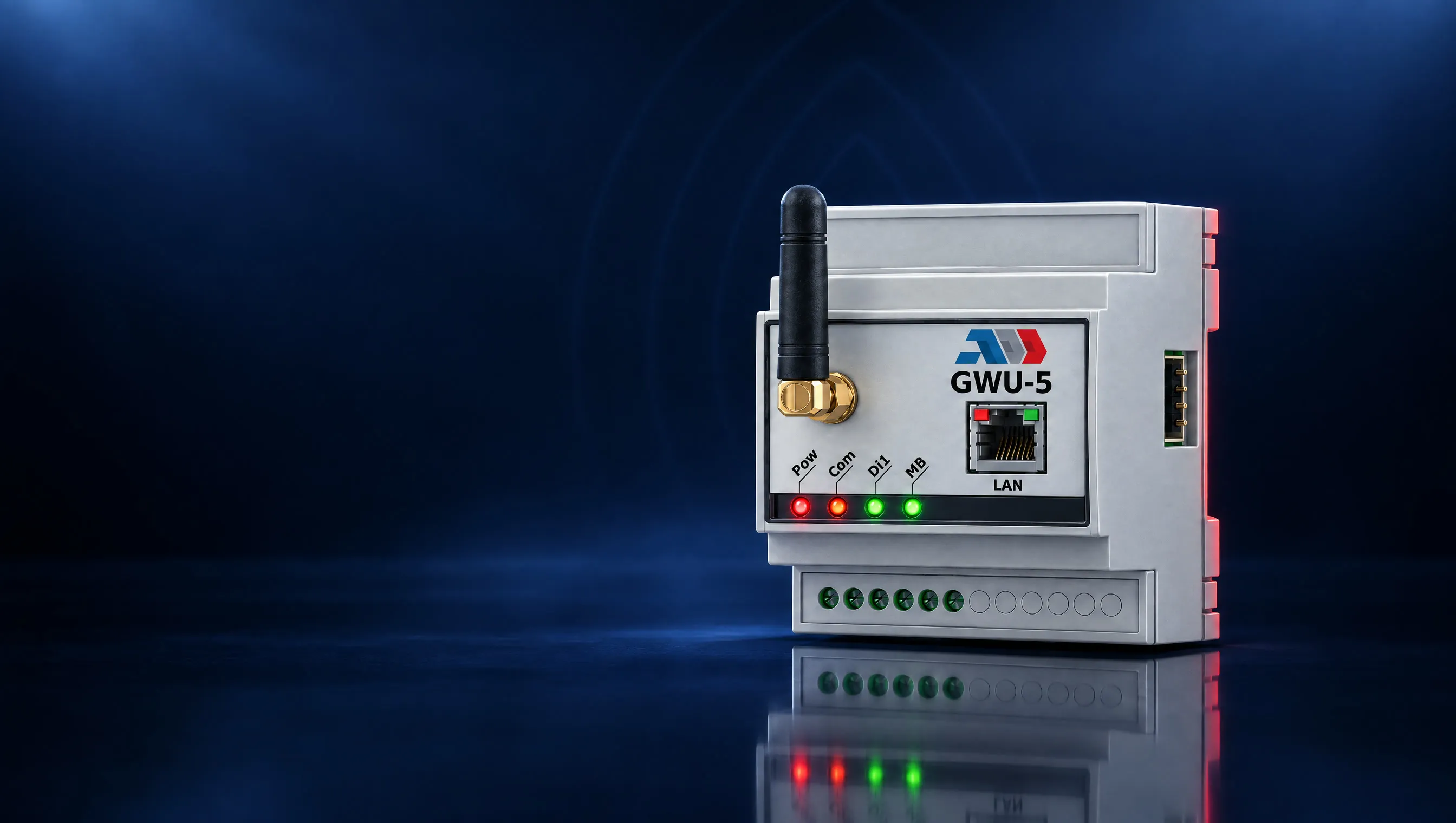
01/ 07
Every update is a site visit
A technician, a car, a laptop, a cable. With thousands of devices it does not happen, and the devices stay on old software for years.

Enrolment at first power-up, configuration, applications, over-the-air updates, alarms and remote access in one cloud console. No servers of your own, and no access to your production data.
* Laboratory measurement on a two-node cluster.
The problem
Connecting the equipment is the easy part. The hard part starts after the installation.
01/ 07
A technician, a car, a laptop, a cable. With thousands of devices it does not happen, and the devices stay on old software for years.
02/ 07
Which device is alive, which version it runs, which one has been silent for a week.
03/ 07
Everything at once, and you hope. One bad version stops the whole fleet.
04/ 07
A device that was offline at that moment never learns that it had to change.
05/ 07
That means fees by volume, data processing agreements and questions from the security department.
06/ 07
Open ports, a VPN to every site, shared passwords and no trace of who did what.
07/ 07
From December 2027 a connected product cannot be offered in the EU without secure updates through its whole life cycle (Cyber Resilience Act). NIS2 requires operators of important infrastructure to prove risk management down to the field device.
The answer
Scan the code from the box. The device connects by itself.
Describe what must be there. The fleet brings itself in line.
In stages, with automatic stop and rollback.
Production data does not pass through the platform.
No open ports. With permission, recording and audit.
Every action, ours included, in an immutable log.
From ten devices to a million, in one console.
Two channels
The gateway keeps two fully separate secured connections to two different servers. The first goes to GridBit Cloud and carries management only. The second goes straight to your broker, cloud or SCADA system and carries your production data. This is not a policy or a promise in a contract. It is how the system is made: your data physically does not pass through our infrastructure.
GridBit Cloud
Health, versions, configuration, applications, alarms
Platform unavailable
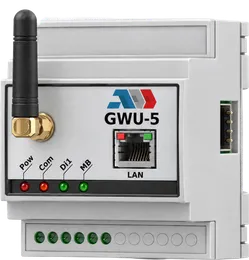
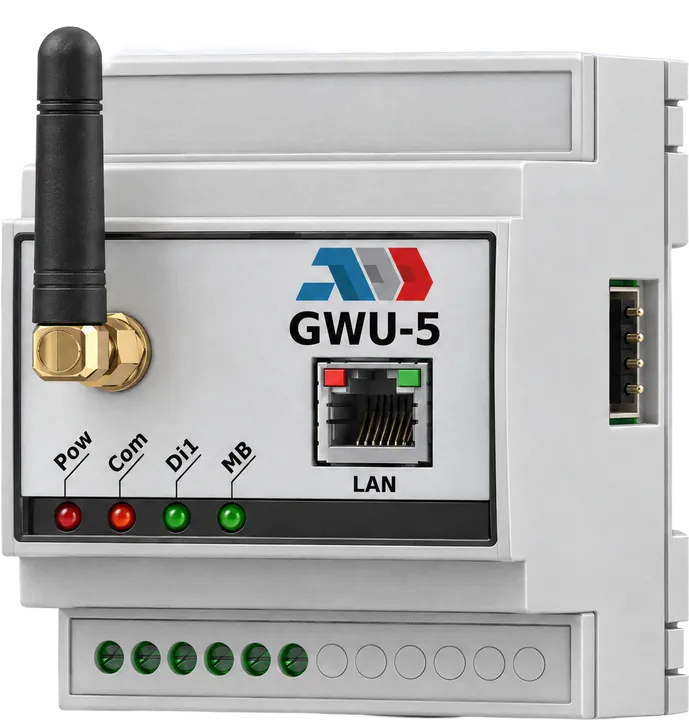
GWU-5 on site
Two secured connections
Your broker, cloud or SCADA
Measurements and process data
The management channel: what the device is and how it should run.The data channel: straight to your system, never through ours.If the platform is down, your data keeps flowing. Management catches up at the next connection.
0bytes of production data through the platform
How it works
A gateway goes through four states in GridBit Cloud. None of them needs keys, passwords or server addresses typed in the field.
01Added
Scan the QR code from the box with a phone, or type the serial number and the claim code. For a whole batch, upload a CSV file. The device joins your organisation and nobody else can add it after that.
Waiting for first connection
02Activated
At first power-up the device creates its own private key, requests a certificate and connects to the platform over a mutually authenticated secure channel. The private key never leaves the device. The console shows whether each device waits for its first connection, is connected or has a problem, and why.
Connected, certificate issued
03Managed
You set the configuration, the applications and the firmware version. You watch its health, receive alarms and open a remote console when you need one.
Online, firmware 2.4.1, in sync
04End of life
You sell the site, replace a faulty unit or take it out of service. The platform moves or clears everything, revokes the certificate and keeps the history.
Retired, certificate revoked
Desired state
In most systems you "send" a configuration or an application. If the device was offline at that moment, the change is lost and nobody notices. In GridBit Cloud you describe how the device, the site or the whole fleet should look. The device compares that with its real state and brings itself in line: after hours or days without a link, after a change of the SD card, after reprogramming.
Desired and actual match.You change the desired state while the device is offline. The console shows the difference.The device reconnects, compares and installs what is missing by itself.In sync again. Nobody repeated a command.
Illustration with sample applications.
Updates without risk
Updates go out in stages, for example 10 %, 50 % and 100 % of the fleet. After each stage the platform checks the health of the updated devices. If the errors pass the threshold, the rollout stops by itself and the affected devices return to the previous version, with no human involved. Before a firmware update the platform checks which installed applications would become incompatible and refuses a silent update that would stop an application.
Stage 1: a tenth of the fleet gets the new version.The health check passes. Stage 2 begins.Errors pass the threshold. The rollout stops by itself.The affected devices return to the previous version. The rest of the fleet never received it.
Illustration of one rollout over a fleet of 100 devices.
The console
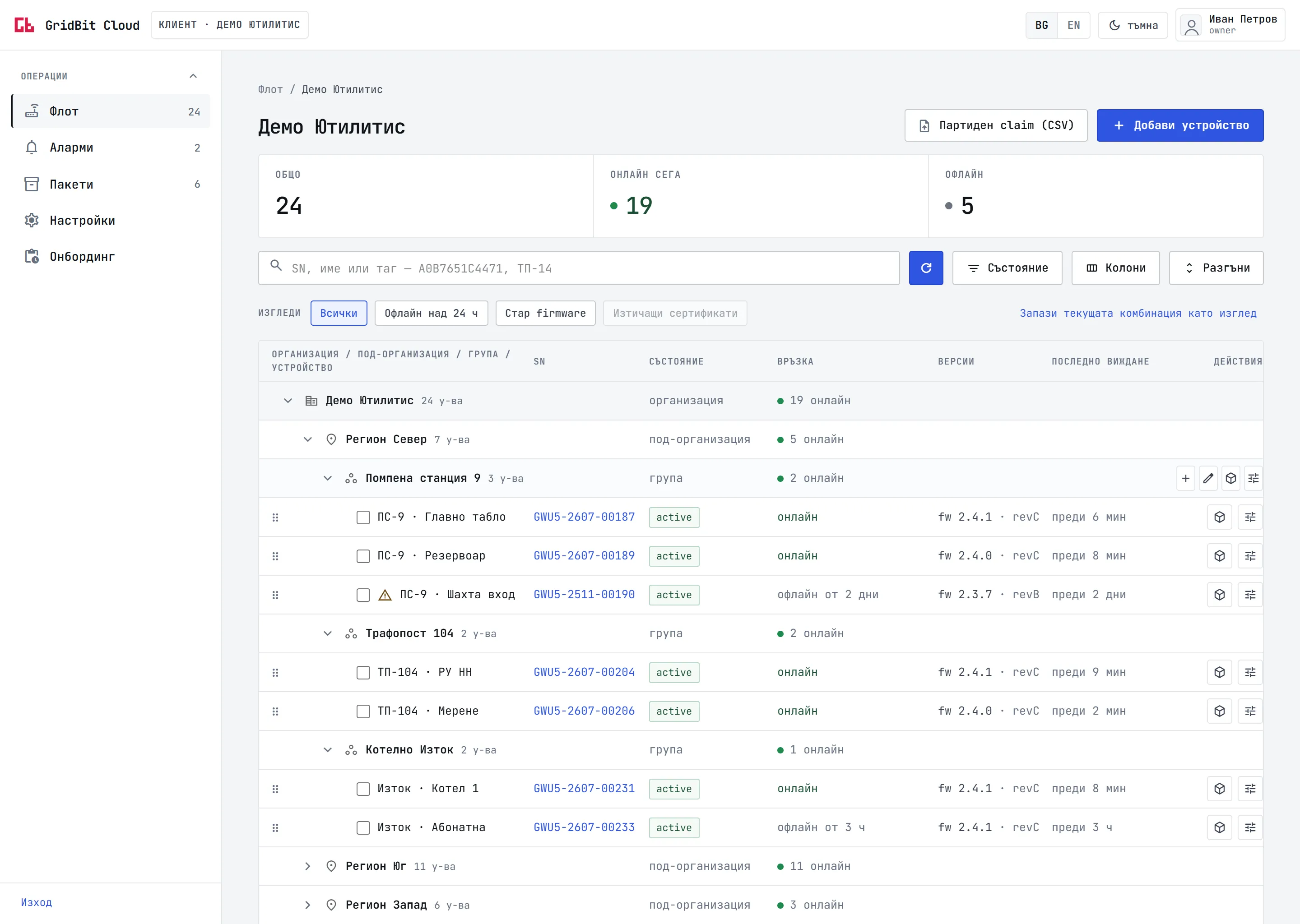
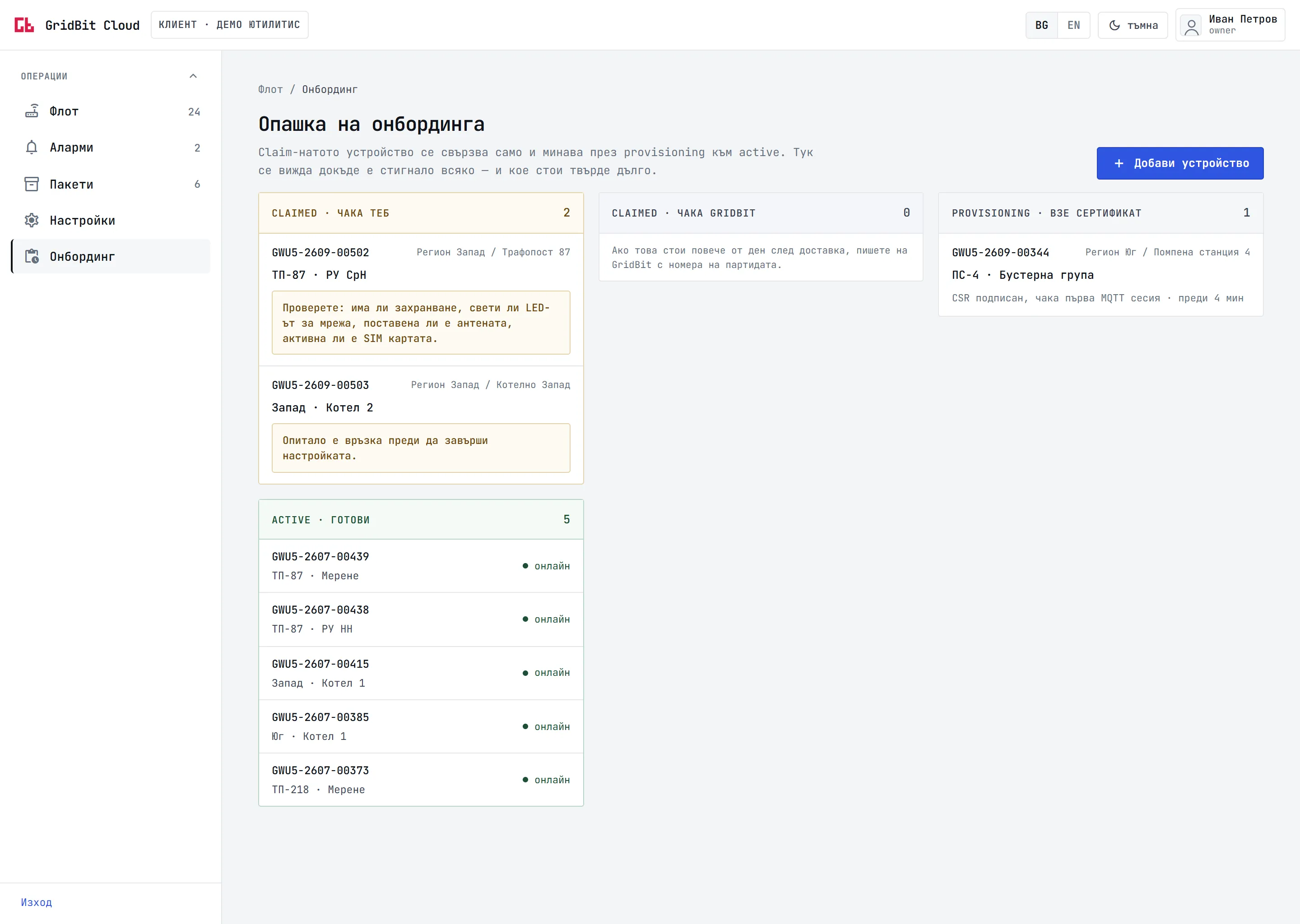
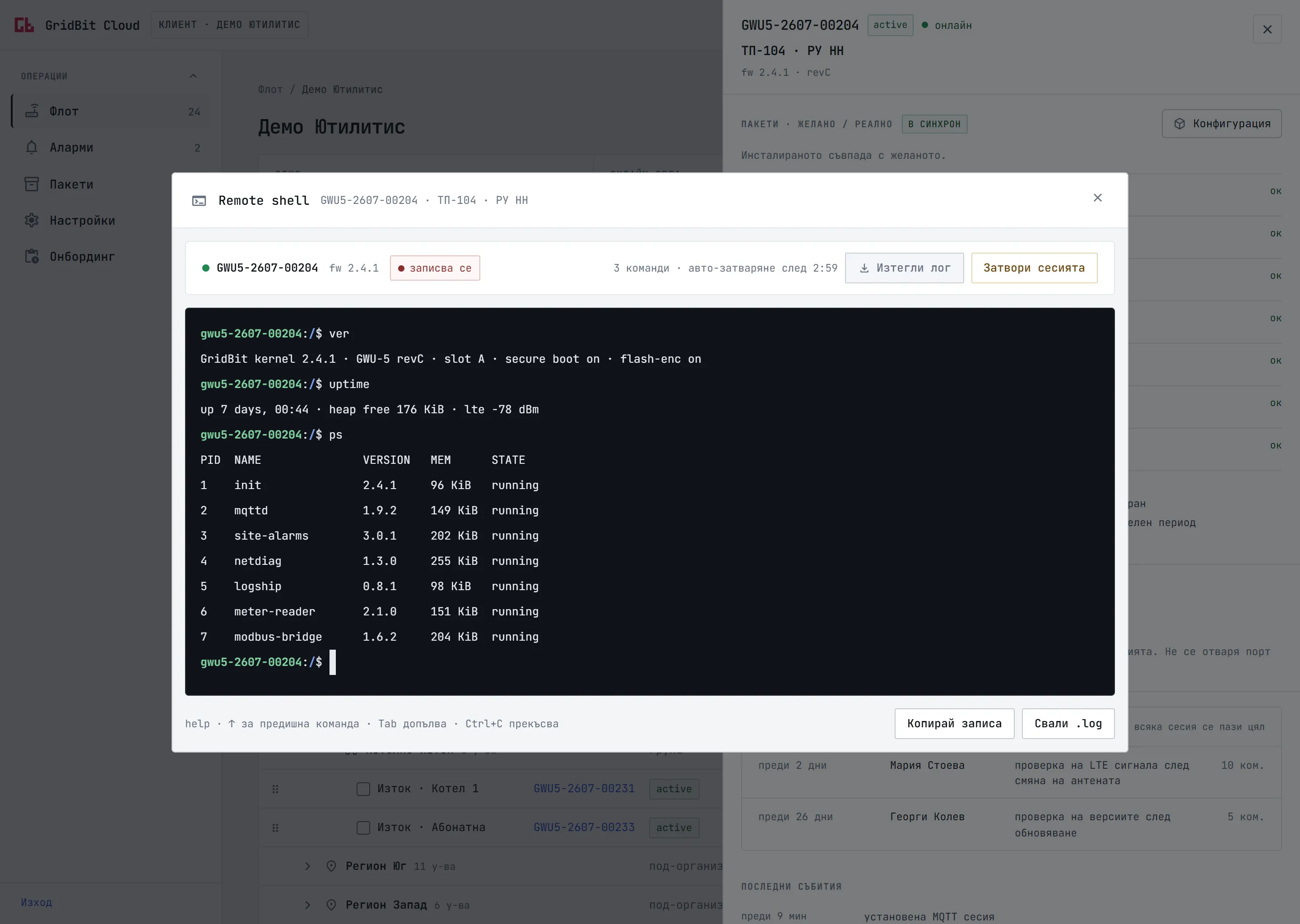
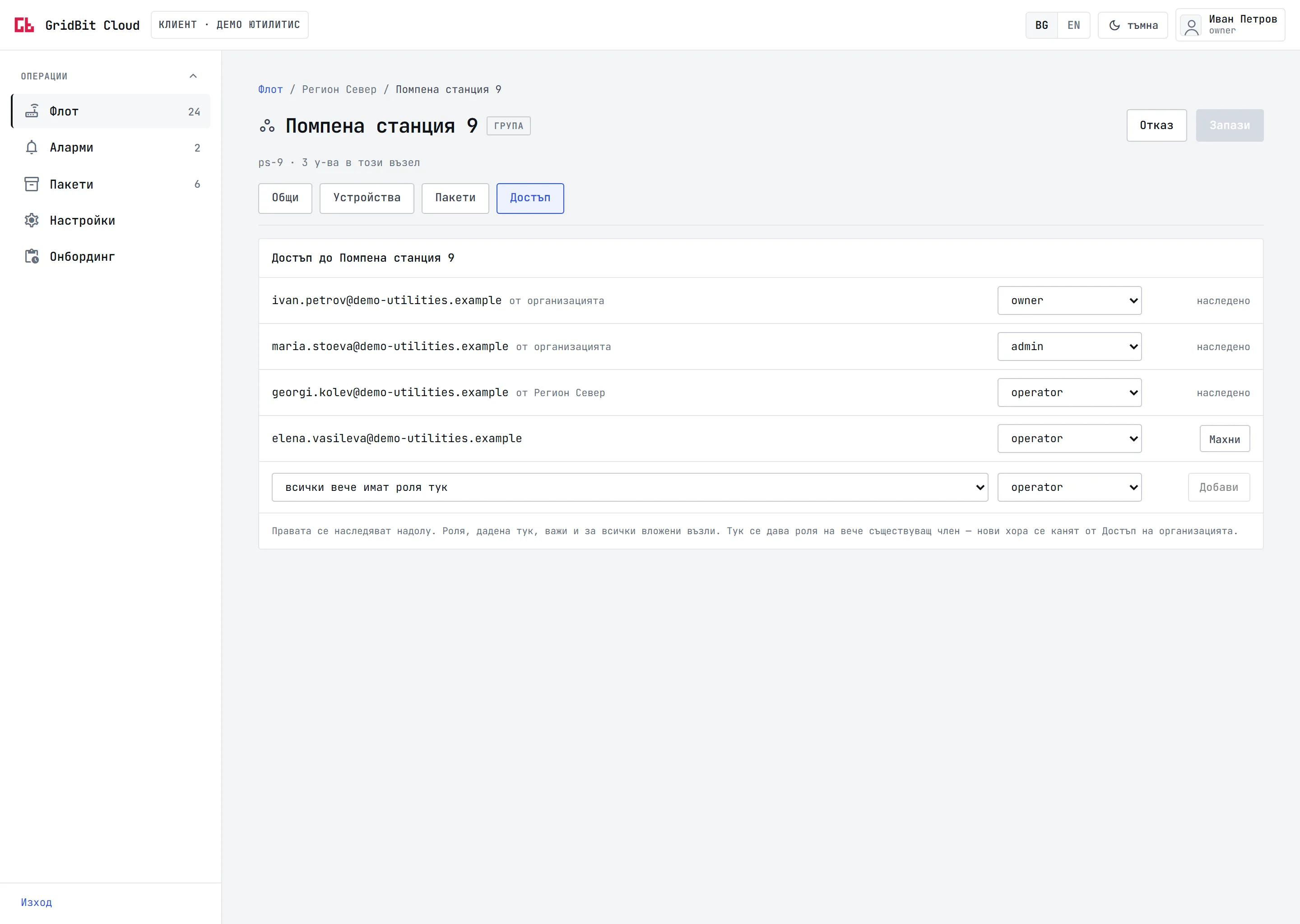
Organisation, regions, sites and devices in one table. Every row shows the state, the link, the firmware and when the device was last seen. Ready views such as "Offline for more than 24 hours" and "Old firmware" sit above it.
The activation queue shows where every added gateway stands: waiting for you with a check list, holding its new certificate, or active. A device that failed says why.
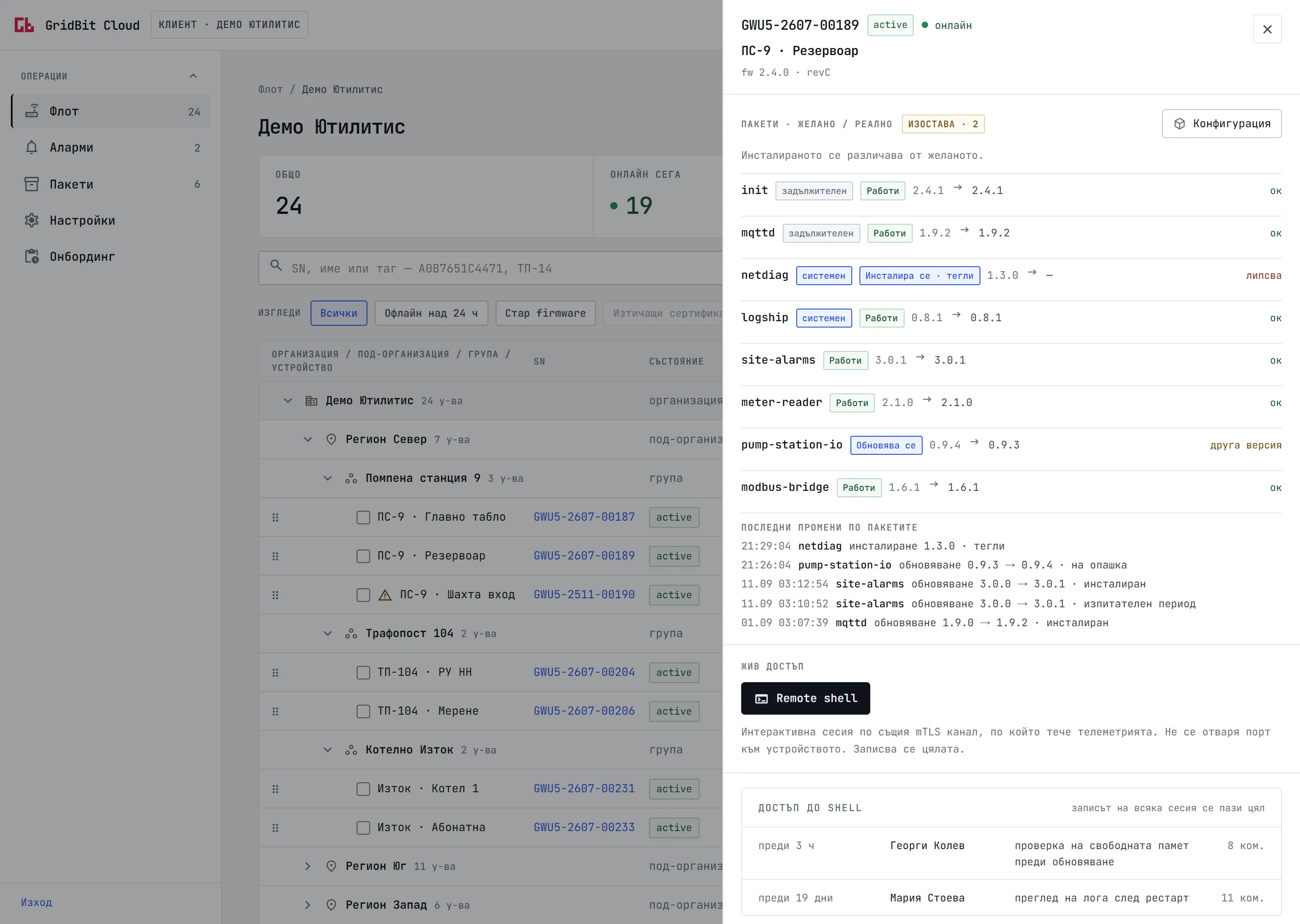
Six packages are in sync, one is missing and downloads right now, one still runs the older version. The badge counts what is behind, and the list under it shows what the device just reported.
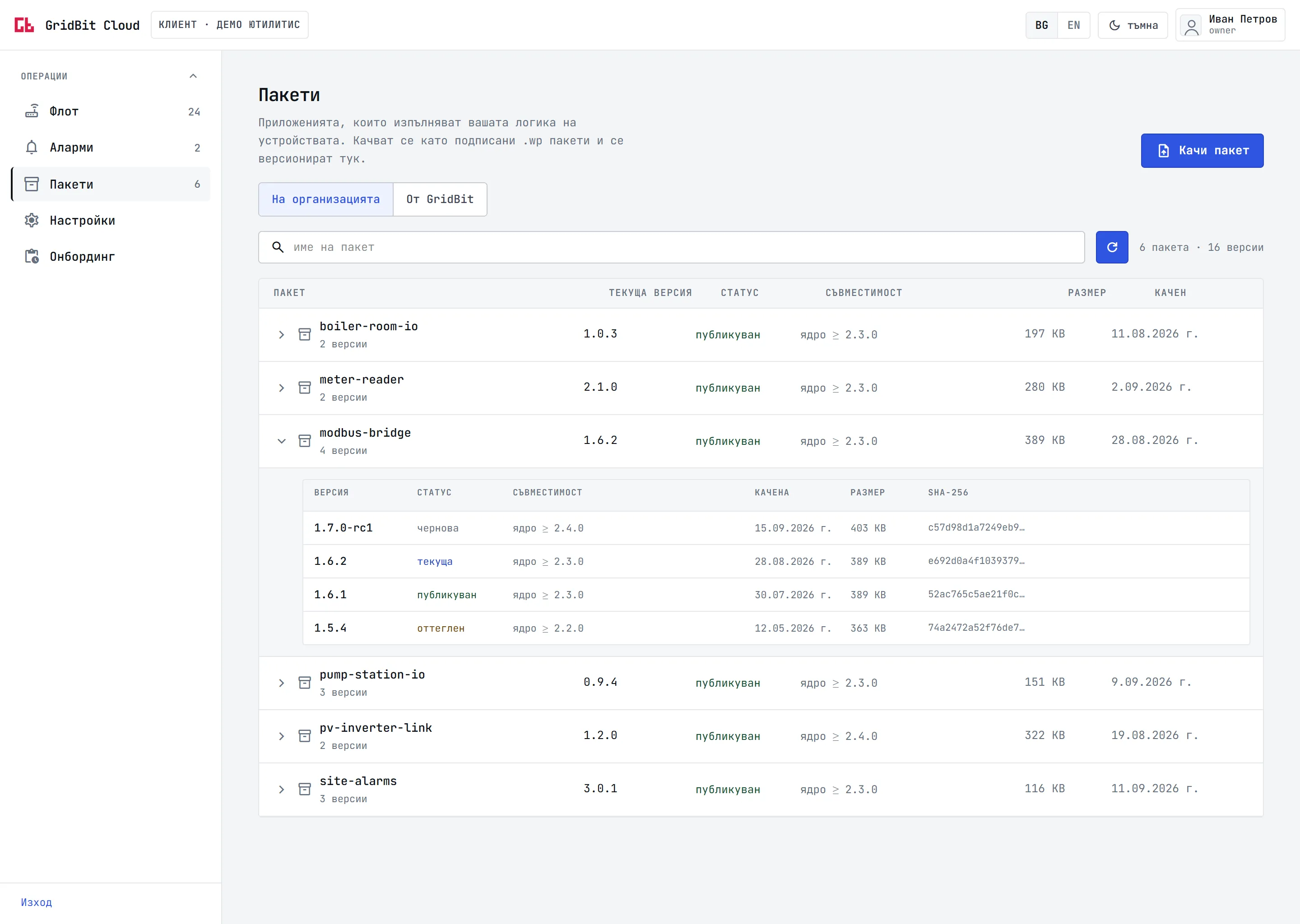
Your own packages with their builds, from a draft through the published version to a withdrawn one, each with its kernel compatibility, size and checksum.
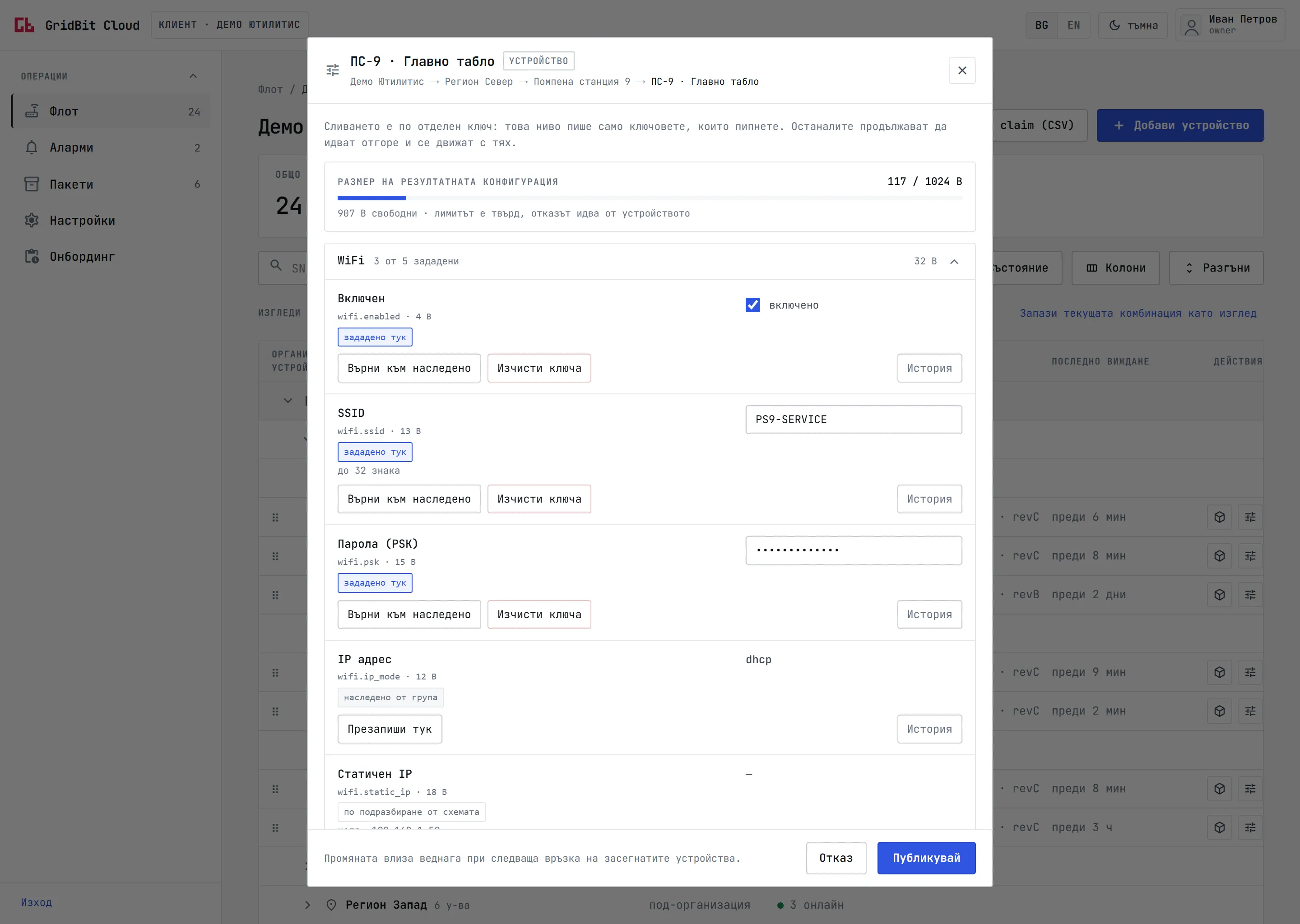
Every key says where its value comes from: set here, inherited from the group, or the default of the schema. One click returns it to the inherited value, and every key keeps its history.
The session starts only after a stated reason, it is recorded from the first key, and it closes by itself after three minutes without activity. The site needs no open ports.
Roles come down the tree, from the organisation and from the region, and a person can get a role on one site only. The list says where each right comes from.
Screens from the console with sample data. The console is in Bulgarian today, an English version is planned.
The console
Organisation, regions, sites and devices in one table. Every row shows the state, the link, the firmware and when the device was last seen. Ready views such as "Offline for more than 24 hours" and "Old firmware" sit above it.
The activation queue shows where every added gateway stands: waiting for you with a check list, holding its new certificate, or active. A device that failed says why.
Six packages are in sync, one is missing and downloads right now, one still runs the older version. The badge counts what is behind, and the list under it shows what the device just reported.
Your own packages with their builds, from a draft through the published version to a withdrawn one, each with its kernel compatibility, size and checksum.
Every key says where its value comes from: set here, inherited from the group, or the default of the schema. One click returns it to the inherited value, and every key keeps its history.
The session starts only after a stated reason, it is recorded from the first key, and it closes by itself after three minutes without activity. The site needs no open ports.
Roles come down the tree, from the organisation and from the region, and a person can get a role on one site only. The list says where each right comes from.
Screens from the console with sample data. The console is in Bulgarian today, an English version is planned.
Features
Every function carries its status, so that this page does not promise something that is not there.
78functions available today
21coming soon
Adding a new device needs no technical training.
Technical telemetry is about the health of the device itself: uptime, memory, versions, connectivity. It is not your production data.
GridBit applications are WebAssembly packages. They run in an isolated environment on the device and reach only what they are allowed to.
One chain of trust for everything that runs on the device: applications, drivers, kernel, recovery.
Benefits by role
Security and trust
From the chip to the cloud, link by link
GridBit cannot enter your device without your explicit permission. The request comes to you, you approve access for a set period of 7 days at most, and you can end it at any time. Every action, ours or yours, stays in an immutable audit log that you can see.
CRA, NIS2, GDPR
Cyber Resilience Act: secure updates through the whole life cycle (from December 2027)
Over-the-air updates of the kernel and the applications, staged rollout, automatic rollback.
Cyber Resilience Act: reaction to a vulnerability (reporting from September 2026)
A fix reaches the whole fleet quickly, in stages and with a result report.
NIS2: risk management down to the field device
Fleet inventory with versions, an immutable audit log, control of remote access, roles and two-factor authentication.
GDPR
Production data does not pass through the platform. Hosting in the EU. Versioned acceptance of a data processing agreement. Deletion of the organisation.
Scale and reliability
Two broker nodes share the devices.One node drops.Its devices are on the standby node in under 4 seconds (laboratory measurement).
High availability at every level
A broker cluster, a database in three copies with synchronous replication, and stateless services that scale horizontally.
Backups
With a continuous archive of the changes, kept for 30 days.
Economical traffic
A light permanent channel for instant commands and grouped telemetry. By design estimate this cuts the number of messages 10 to 100 times.
A console for every scale
With 12 devices you look at the list. With 50 000 you work with summaries, search and ready views.
Hosting in the EU
The management data stays in the European Union.
A managed service
You install nothing and you maintain no servers, databases or brokers.
Comparison
| Own scripts | General IoT platform | GridBit Cloud | |
|---|---|---|---|
| Adding a new device | By hand, from a list | Through an API, with keys typed by hand | QR code from the box, self-activation |
| Device identity | Shared passwords or keys | A certificate loaded in production | A key created in the chip that never leaves the device |
| Changing an application | A file copied by hand | A command, lost when the device is offline | Desired state, the device brings itself in line |
| Updating | Everything at once | By hand, group by group | In stages, with automatic stop and rollback |
| Updating the kernel | A technician on site | Rarely supported | Over the air, encrypted for each device |
| Client data | Through your infrastructure | Through the platform, often with a fee by volume | Does not pass through the platform |
| Remote access | VPN, open ports | Depends on the vendor | No open ports, with approval, recording and audit |
| Who can run foreign code | Anyone with access | Depends on the device | Signed code only, checked by the device |
| Servers to maintain | Yours | None | None |
Industries

Secondary substations, photovoltaic parks, metering points. Hundreds of sites without staff, in a sector under NIS2. Security updates for the whole fleet without site visits.

Pump stations and reservoirs in remote areas, often with LTE only. Remote access without a public IP address and without a VPN.

Boiler rooms, HVAC systems, charging stations. Thousands of devices arranged by cities and buildings, with configuration at site level.

Old machines connected to modern systems. Your own logic at the edge of the network, rolled out to every line in hours.

Greenhouses, irrigation systems, silos. Low consumption, LTE connectivity and devices that keep working when the link is down.

A gateway built into the machine, with fleet management, updates and transfer of ownership at a sale, without a cloud of your own.
How you start
What is coming
Soon11
Planned10
Hardware
GridBit Cloud is not a general platform for any device. It was created together with the operating system of the GridBit gateway, and that is why it reaches where general platforms cannot: an identity born in the chip, code that the device checks by itself and a fleet that repairs itself after days without a link. Today it manages the GWU-5 gateway.
FAQ
No. The gateway sends your data over a separate connection straight to your system. The platform sees only the technical state of the device: whether it is online, which versions it has, how much memory is free.
The devices keep working and keep sending data to your system, because that channel does not pass through us. Management comes back by itself at the next connection, and the devices catch up with every change made in the meantime.
Only with your explicit permission, for a period that you set (up to 7 days) and with a full trace in the audit log. You can end the access at any time.
Updates go out in stages. If the errors after a stage pass the threshold, the rollout stops by itself and the affected devices return to the previous version.
No. The device dials out by itself. Management and remote access work behind CGNAT, firewalls and mobile networks.
You mark it as lost. It is refused at connection and, if you choose, wipes itself at the next attempt. The device itself has encrypted memory and unique keys, so the stolen box gives nothing away.
Yes. Applications are written in Rust, C or Go and compiled to WebAssembly. You upload them to the private registry of the organisation and roll them out to your fleet without approval from GridBit, as long as they need no privileged access.
No. GridBit Cloud was created together with the operating system of the GridBit gateway, and today it manages the GWU-5. That deep integration is what gives an identity born in the chip and a check of the code by the device itself.
The same console works for 10 devices and for 50 000. The architecture is designed for more than a million.
In the European Union.
No. The platform is a managed service. You need a browser.
A command line tool and service accounts for clients are coming soon. A public REST API is in the plan.
Bulgarian. An English version is planned.
Show us your sites and we will show you how your fleet looks in GridBit Cloud.